Updating Patient Outcome (Disposition)
In this tutorial, you will learn how to update your patient's disposition.
What is Outcome (Disposition)?
Outcome or disposition refers to the final outcome of the patient, indicating whether it was released, died in care, transferred to another site, etc.
Step 1
Visit https://www.wrmd.org/signin and log into your account using the username and password that you registered with.
Step 2
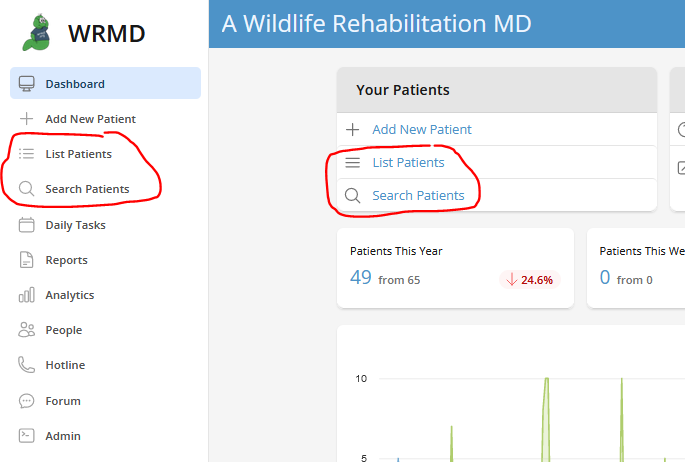
Access your patient's record by either conducting a patient search or utilizing the list patient feature on the dashboard. These features are available in two different sections on the dashboard.
Step 3
On the patient's record, click on either the Continued Care tab or Initial Care tab and scroll to the bottom of the record to the Outcome section.

Step 4
WRMD's default status of the patient is Pending as it assumes the animal is being cared for. Use the drop-down menu to change that setting to whatever is relevant for your patient. WRMD's dropdown menu provides the following standard outcomes:
- Pending
- Released
- Transferred
- Dead on arrival
- Died +24hr
- Died in 24hr
- Euthanized +24hr
- Euthanized in 24hr
Step 5
After selecting an Outcome other than Pending, provide the following details as applicable:
- disposition date
- release type (for Released disposition) or transfer type (for Transferred disposition)
- disposition address and location. For a Released or Transferred outcome, click Copy Address From Intake to copy the address the patient was found at. For a Dead on arrival, Died or Euthanized outcome, click Copy Address From Organization to copy your organization's address.
- reason for disposition
- person performing disposition (Dispositioned By)
- person who transported the animal (for Released or Transferred dispositions)
Step 6
When you have finished your update, click the green Update Outcome button.