Updating Initial Care Information
In this tutorial, you will learn how to update a patient's initial care record.
What is Initial care?
Initial Care refers to the first 24 hours of care an animal receives after arriving at your center.
Updating a patient's initial care record
Step 1
Visit https://www.wrmd.org/signin and log into your account using the username and password that you registered with.
Step 2
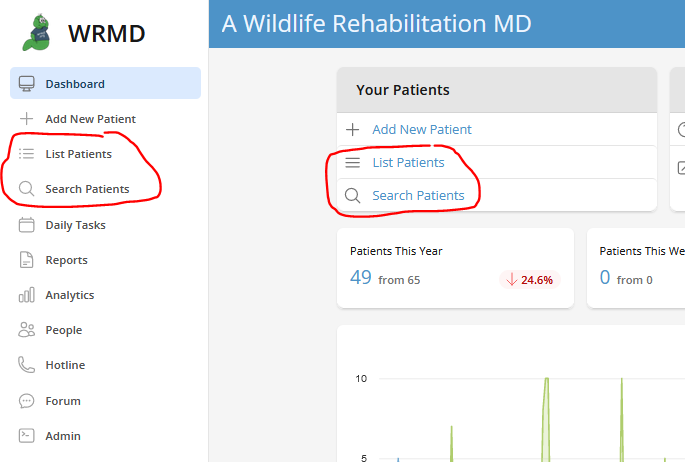
Access your patient's record by either conducting a patient search or utilizing the list patient feature on the dashboard. These features are available in two different sections on the dashboard.
Step 3
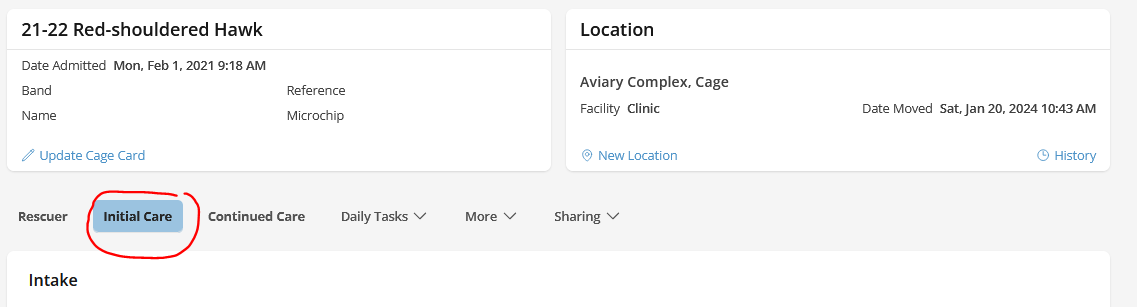
Go to the patient's record and click on the Initial Care tab.
Step 4
On the initial care page, you will see four panels. Fill in the relevant information based on your exam findings. Make sure you include the examiner's name(s) and the treatment that would be relevant to the animal's care.
- Intake
- The data in the intake panel corresponds to the information provided during the admission process. As such, updates may not be necessary. However, it serves as a valuable reference during your initial examination. It offers insights into the animal's origin, the reason for its presence in our center, and details about the rescuer's actions
- Exam Form
- This is a standard form used for nearly all patients and species. You can fill in the fields as you complete your initial exam.
- Clinical Summary
- In this field, you can include any diagnosis you have for the animal – what you know for certain or what you suspect.
- Outcome
- Information in this field relates to the animal's disposition. In the event the animal arrived dead, died, or needed to be euthanized in the first 24 hours, you can include that information here.
Step 5
Click the green Update button in every section you filled in.
Understanding the Exam Form Panel
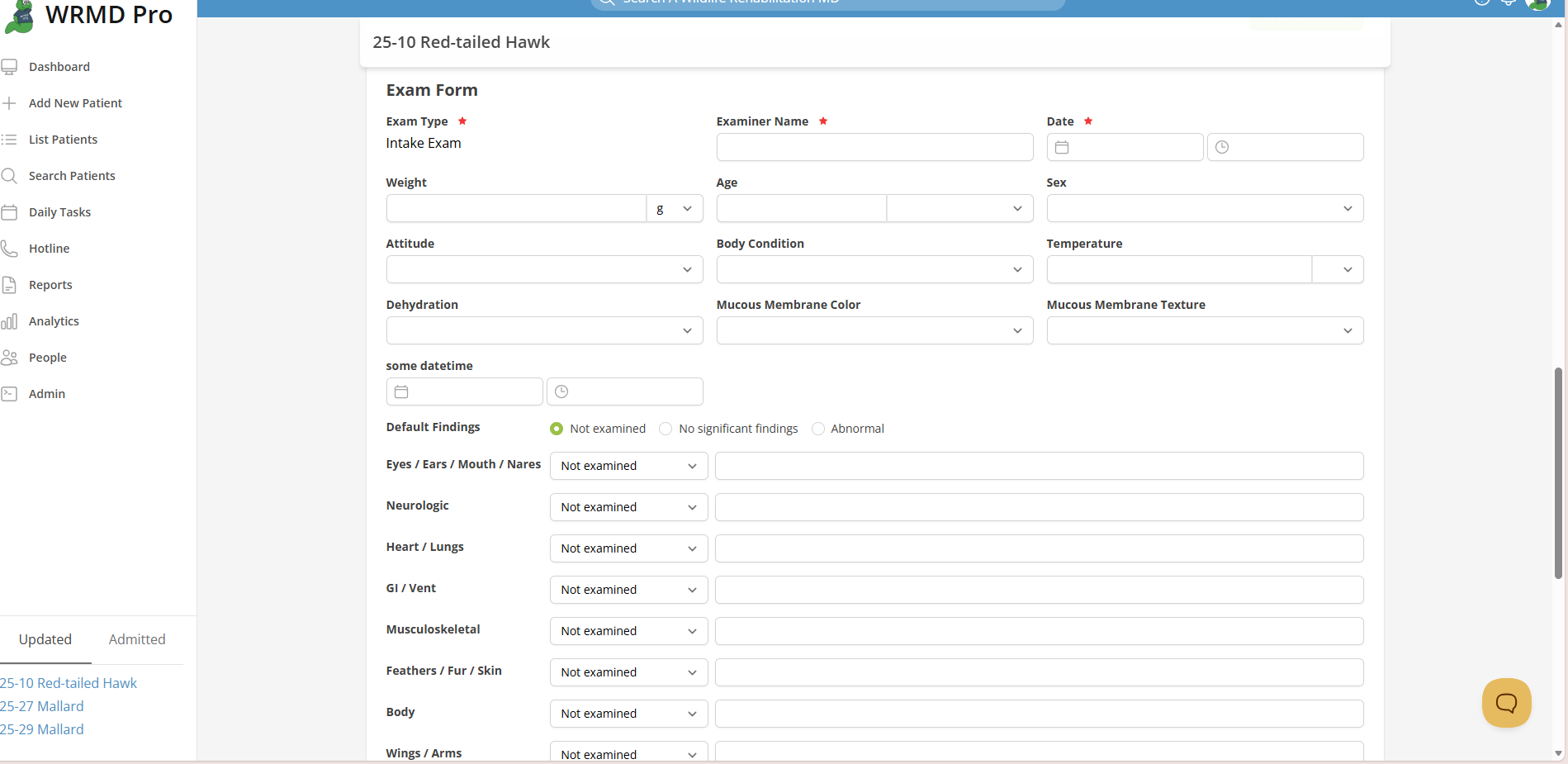
This standard form is utilized for all patients and species. WRMD's streamlined process makes it easy for you to fill in your patient's details. The date defaults to the current date. This form allows you to select "Not examined", No significant findings", and Abnormal". By selecting one of these options, it will autofill the entire exam findings. Once selected, you can go in and edit the fields individually. The form includes dropdown menus for dehydration, attitude, mucous membrane color/texture, age, sex, and body condition (BCS). In the age field, the dropdown menu lists age in terms of species type, but you can also designate an animal's age in chronological time. In the fields delineating the major body parts, the dropdown menu defaults to "Not examined". As you input information into the text box, this area changes to "Abnormal." If you've examined the area and didn't find an issue, you can choose "No significant findings" from the dropdown menu. Although you can still provide comments in the textbox, the dropdown menu will remain unchanged as WRMD respects your choice. The treatment and comment boxes allow you to input any pertinent information related to the patient's care. In the Examiner field, please enter the name(s) of the person(s) conducting the initial examination." Always click the green Save Exam button to save your inputs.
Understanding the Outcome Panel
The outcome panel refers to the disposition of the animal. While ideally, you wouldn't fill this out during the initial exam, there are instances where it becomes necessary, such as when the animal is dead on arrival, needs to be euthanized, or dies within the first 24 hours. To document the animal's disposition, use WRMD's dropdown menu which provides the following standard outcomes:
- pending
- released
- transferred
- dead on arrival
- died +24hr
- died in 24hr
- euthanized +24hr
- euthanized in 24hr
Always click the green Update Outcome button to save your choice.
