How to Duplicate a Patient
In this tutorial, you will learn how to copy an existing patient record into a new one.
Why Duplicate a Record?
You may want to duplicate a record if the patient you have received is similar to an existing record. For example, you may encounter a situation where the same rescuer finds the sibling of an animal they brought in previously. Since the rescuer information and location details are the same, it will save you time if you simply duplicate the existing record.
How to Duplicate a Record
Step 1
Visit https://www.wrmd.org/signin and log into your account using the username and password that you registered with.
Step 2
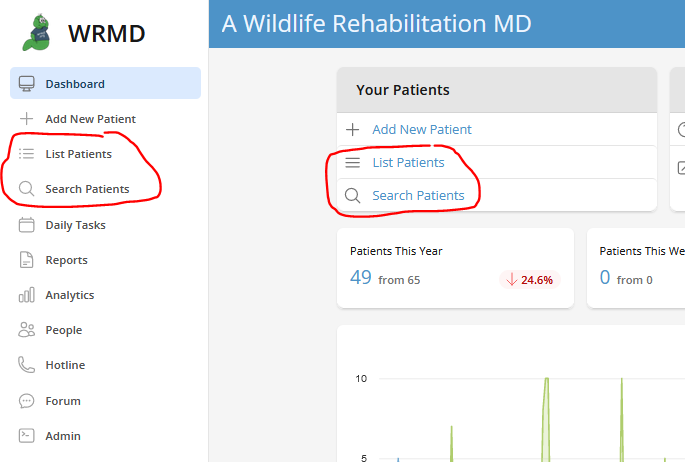
Go to the patient record you wish to duplicate by either conducting a patient search or utilizing the list patient feature on the dashboard. These features are available in two different sections on the dashboard.
Step 3
Click on the More tab and choose Duplicate Patient on the dropdown menu.

Step 4
Review the details of the new record to confirm accuracy. The date will default to the current date, and the new patient will have a new patient number. The rescuer's contact information and the intake information will have been transferred over from the source patient, but you can modify, add to, or change details as needed. You can also set the number of duplicates to create (up to 20 at once).
Step 5
Click on the green Duplicate Patient into [year] button to confirm and create the duplicate(s). If you are duplicating into a previous year, the button will appear in red as a caution indicator.