Managing Your Account Extensions
In this tutorial, you will learn how to manage your account extensions. This is a general overview of the extensions as each extension will have its own tutorial on how to use them.
What Are Extensions?
Extensions are features in WRMD that you can activate which will give you more power and ability as it relates to your patient records. While most features relate to patient records, not all of them do. For instance, there is a hotline extension that allows you to keep records of any phone calls or outside communications you've had with the public about wildlife in distress.
How to Activate or Deactivate an Extension
Step 1
Visit https://www.wrmd.org/login and log into your account using the username and password that you registered with.
Step 2
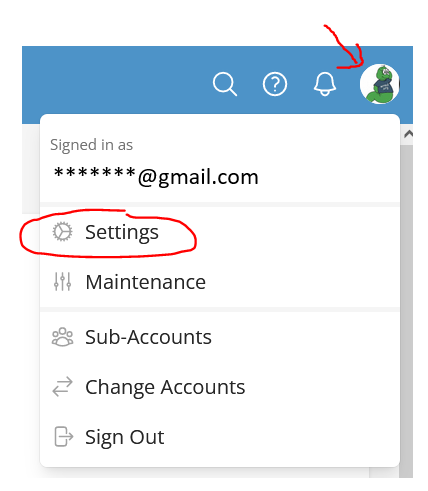
To access your settings, click on your avatar in the upper right corner and choose settings from the drop-down menu.
Step 3
On the sidebar, click on Extensions.

Step 4
You will see a list of Extensions that you can activate or deactivate, organized into two categories:
- Standard Extensions: Available to all WRMD organizations.
- Pro Extensions: Available exclusively to WRMD Pro organizations.
Click the Activate Extension control on whichever extension you wish to turn on. Once you have activated an extension, it will stay activated until you deactivate it. To deactivate an extension, use the deactivate control on that extension.
