Managing Care Log Settings
In this tutorial you will learn how to manage the settings of the Care Log. The Care Log Settings allows the administrator to establish parameters for the patient record where you input medical details about your patients. You can determine how to display the care log records and who has permission to edit and delete records.
Manage Care Log Settings
Step 1
Visit https://www.wrmd.org/login and log into your account using the username and password that you registered with.
Step 2
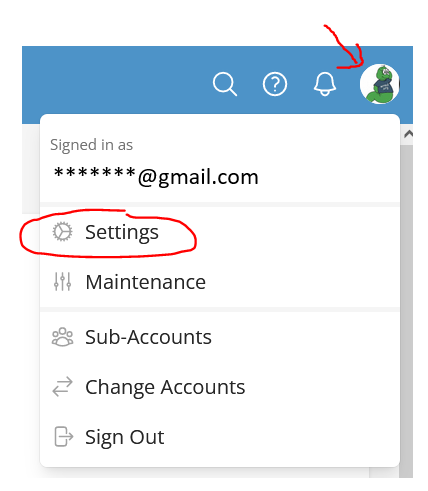
To access your settings, click on your avatar in the upper right corner and choose settings from the drop-down menu.
Step 3
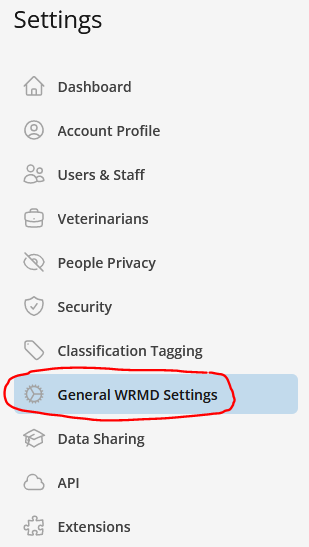
On the sidebar, click on General WRMD Settings.
Step 4
You will see a category called Care Log Settings.
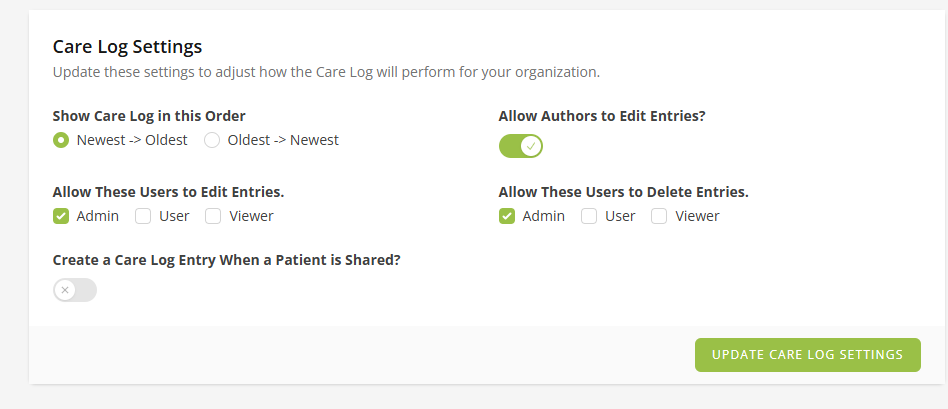
In this section, you can choose the order you wish your care log to be displayed and who can edit and delete records. You may also wish to keep these at their default settings.
- Order of Care Log: Here you can choose to view logs in the following order: "newest to oldest" or "oldest to newest"
- Allow Authors to Edit Entries: When enabled, the user who created a care log entry can edit their own entries.
- Permission to edit entries: In traditional medical record-keeping, an entry cannot be changed, but here you can choose which user roles can edit entries.
- Permission to delete entries: Here you can limit which user roles may delete entries.
- Create a Care Log Entry When a Patient is Shared: When enabled, WRMD automatically adds a care log entry when a patient record is shared with another organization.
Step 5
If you made any changes, click the Update Care Log Settings button.